How to Check iPhone Storage and Why It Fills Up So Quickly
The real question isn't where to find iPhone storage, but why it fills up so quickly
Few things are more frustrating than pulling out your iPhone to take a photo, download an app or save a video only to see the message: “iPhone Storage Full.” That’s why thousands of people search every month for one simple question: how to check iPhone storage.
But behind that search is a bigger concern. People aren’t just looking for a menu inside iOS—they want to know what is taking up so much space, why their phone feels slower and whether they need to buy a new device or pay for more iCloud storage.
The good news is that checking your iPhone’s storage takes only a few seconds, and understanding what you find can help you free up space and keep your device running smoothly.
How to Check iPhone Storage
To see how much storage is available on your iPhone:
- Open the Settings app.
- Tap General.
- Select iPhone Storage.
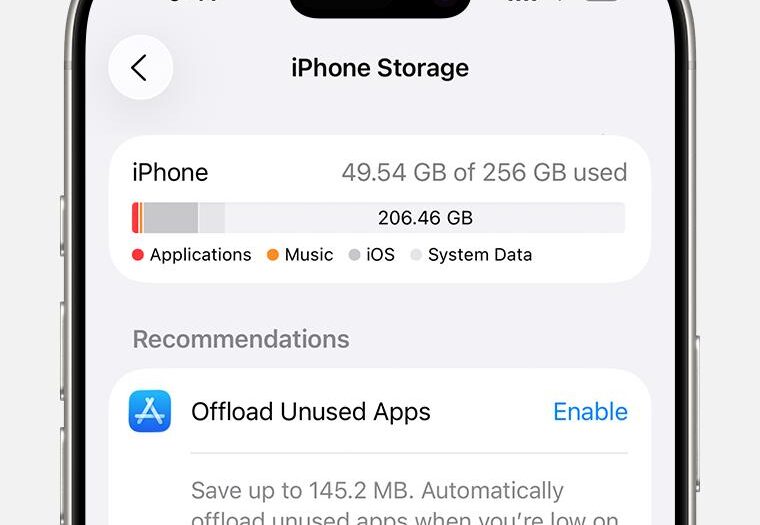
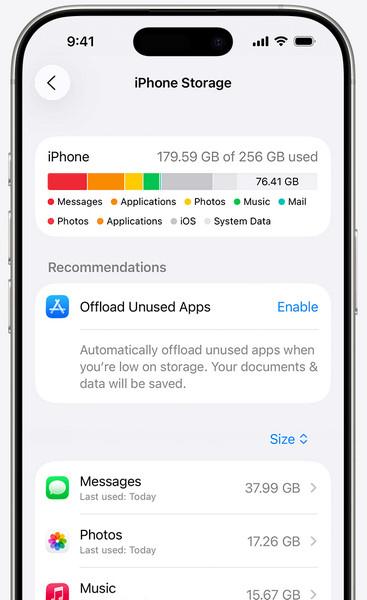
Your iPhone will display a color-coded bar showing how your storage is being used. Categories may include:
- Apps
- Photos
- Messages
- Media
- System Data
- iOS files
Below the graph, you’ll see a list of apps ranked by how much storage they use.
If your iPhone storage is almost full, checking your storage breakdown regularly can help you identify which apps, photos or files are using the most space. Many users discover that cached data and old videos consume far more storage than expected.
What Is Taking Up So Much Space on My iPhone?
For many users, the biggest storage consumers are:
Photos and Videos
High-resolution photos and 4K videos can quickly consume dozens of gigabytes, especially if you rarely delete old files or regularly record videos.
Apps and Games
Some apps, particularly social media platforms and games, store large amounts of cached data over time. Streaming apps can also download content in the background without users realizing how much storage is being used.
Messages and Attachments
Text conversations containing videos, GIFs and images can quietly occupy several gigabytes.
System Data
This category often confuses users. It includes caches, logs and temporary files that iOS uses to keep the system running efficiently. In some cases, System Data can grow unexpectedly large and may require a device restart or a software update to reduce its size.
How to Free Up iPhone Storage
Once you know how to check iPhone storage, the next step is deciding what to remove.
Apple offers several recommendations directly in the storage menu, including:
- Offloading unused apps.
- Reviewing large attachments.
- Deleting old downloads.
- Enabling iCloud Photos.
You can also:
- Remove duplicate photos.
- Delete videos you no longer need.
- Clear browser downloads.
- Uninstall apps you haven’t used in months.
- Delete old message attachments.
- Move files and photos to cloud storage services.
Regularly reviewing your storage settings can prevent your iPhone from slowing down and help avoid the dreaded “Storage Full” warning.
Do You Need More Storage or a New iPhone?
Not necessarily.
Many people assume that a full storage warning means it’s time to upgrade, but often the problem is simply years of accumulated files, screenshots, downloaded videos and unused apps.
However, if you regularly record 4K video, download large games or keep thousands of photos on your device, you may eventually need an iPhone with more storage capacity or an iCloud+ subscription.
Why This Search Matters
The popularity of searches like how to check iPhone storage says something about modern smartphones: they have become digital archives of our lives.
Our phones hold years of memories, work documents, conversations and entertainment. Storage is no longer just a technical specification—it determines how comfortably we can use the devices we rely on every day.
The next time your iPhone warns that storage is almost full, the issue may not be that your phone is too small. It may simply be time to take a closer look at everything you’ve been carrying around in your pocket.
Frequently Asked Questions
How do I check storage on my iPhone?
Open Settings, tap General and then select iPhone Storage to see a detailed breakdown of your available and used storage.
Why is my iPhone storage full?
Photos, videos, apps, downloads and cached data are usually the biggest storage consumers.
What is System Data on iPhone?
System Data includes caches, logs and temporary files that iOS uses to operate efficiently.
Can I free up storage without deleting my photos?
Yes. You can enable iCloud Photos, offload unused apps and remove temporary files and downloads.
Does iCloud give me more iPhone storage?
No. iCloud provides cloud storage for backups and files, but your iPhone still has a fixed amount of physical storage.
For trust and authority, add an external source from Apple Support.
Recommended:
May you interest on: